Jon Benson AI Collective Review (2026): Can It Help You Put AI to Work?

This Jon Benson AI Collective review begins with Jon’s objection to an AI shortcut: replacing himself with a video avatar.
“I’m like Tony Robbins. I’m, like, very animated,” he told me. The avatar approach he was discussing didn’t suit that delivery.
AI Collective is his live AI implementation coaching membership. And that little distinction gets to the reason I’d pay attention to it: learning how Jon chooses what to use, what to reject and what to combine.
If you’ve tried making content with AI, you’ll recognize the trap. You learn what a tool can produce, then spend the afternoon trying to make that output useful for your business. Congratulations. You’ve automated yourself into another editing job. 😬
Jon is at the cutting edge of practical AI. But the useful part for a business owner is the judgment behind his experiments. In our conversation, he explained why he still wanted himself on camera, which production problems he wanted tools to solve, and how his AI assistant was preparing work for his group.
“Can I apply this to my own business without becoming a programmer?”
And the buying question: “Is that guidance worth $297 a month—or $797 paid quarterly—plus the apps?”
I get it. I was a customer of Jon’s before AI was the conversation. In our recorded interview, I asked where people should learn AI and where they should simply use a tool someone has already built.
His answer gives you a useful way to evaluate this membership. Start with the job you want done. Then learn how he chooses and directs the tools around it. The following examples show what that means; the membership and app commitments determine whether it fits your budget.
AI Collective Summary
I recommend AI Collective for business owners who want to learn practical AI implementation from Jon Benson and will bring real work to the coaching. The membership combines live guidance, the YouCloned setup and skills, recorded sessions and community. The strongest fit is someone who has a project to move forward: a content workflow, a business assistant or a stack that needs connecting.
The current options are $297 monthly or $797 upfront every three months, with separate app subscriptions. Quarterly saves $94 against three monthly payments and includes four advertised bonuses. Choose monthly when you want the shorter commitment; choose quarterly when you already intend to use three months. Coaching payments are non-refundable, so join with a project and room to implement.
Judgment
See how Jon chooses, rejects and combines AI tools.
Guidance
Bring your own business questions to live coaching.
Setup
Start with the advertised stack and supplied skills.
Investment
Compare monthly and quarterly commitments.
Terms
Understand cancellation, downloads and renewal.
Fit
Choose the guidance that matches your next project.
AI Collective Pros
AI Collective Cons
Affiliate disclosure: If you buy through my links, I may earn a commission at no extra cost to you.
Why Trust This Jon Benson AI Collective Review?
Copying a list of AI tools tells you very little about whether a membership will help you. The useful questions concern the work: what the creator actually does with those tools, how he chooses between them and where a human still has to intervene.
Those were the questions I took to Jon. Our recorded conversation covered the roles of his copywriting tools, the business assistant he calls Isaac, and AI Collective’s place in learning how to connect them.
Jon is the copywriter behind BNSN. He also described 14 years as a graphic designer before writing Fit Over 40. When he explained his design skills, he got into font spacing and page presentation—the details he builds into instructions for AI. His perspective crosses the words and the production.
I’ve also built my own webinar and it did six figures. Packaging expertise, explaining an offer and getting people to buy are familiar work. That’s the perspective I bring to Jon’s examples: what does this change for the business owner trying to get a useful piece of work finished?
The conversation supplies Jon’s explanations in his own words. The current offer supplies the membership, app and payment details below. You’ll see his reported outcomes attributed to him, alongside the practical lesson each example supports.

From my recorded conversation with Jon Benson about how he puts AI to work in his business.
What Makes Jon’s AI Judgment Worth Learning From?
He kept the performance and tackled the production friction
Jon was discussing the voice and video work he planned to cover in AI Collective’s upcoming Thursday session. He made an important distinction: his “mental clone,” the assistant that knows his business, was different from a video avatar.
For an avatar, his criterion was the delivery. Could it carry the way he actually talks?
He pointed to Julia McCoy as someone whose avatar he thought worked well, then contrasted her slower, less animated delivery with his own. He wasn’t convinced an avatar could carry his level of animation convincingly. He expected the technology to improve, but that wasn’t the approach he was excited about in this conversation.
The test was whether the tool suited the speaker—not merely whether it could generate a talking face.
Then he named the less glamorous problem. Recording a minute of video wasn’t difficult for him. Being ready to record was: coming home from the gym, not being showered, not having good lighting. During our interview, he complained about the rainy day’s light.
Even at the cutting edge of AI, apparently, you can still be defeated by the weather.
He described using another production tool to address those problems and combining it with his voice work for a YouTube video. His starting point remained a real recording of himself.
Keep the delivery that matters. Use tools on the friction that gets in its way. That’s a decision you can apply to your next video before spending hours learning an avatar system.
Isaac handled a different job: preparing the session
Later, Jon explained what he meant by a business assistant. His is called Isaac, and he described it as running on a combination of Claude Code and Codex.
He gave me a specific assignment it could take: delegate the preparation of that day’s AI Collective presentation, find subjects to discuss, and include graphics and illustrations.
Then, further into the interview, he returned to that example:
“When we first started the call and you saw me typing, that’s what I typed in. My presentation is done.”
— Jon Benson, from our interview
Jon reported that Isaac had finished his presentation for the group. This was preparation for the teaching session, a separate task from the video-production example.
The short instruction depended on a long history. Jon said Isaac had his products, videos and 25 years of his personal emails to draw on. It already had material about what he sells and how he communicates.
And he still had to correct it. Even with that context, he said, Isaac sometimes produces something that makes him respond: “I would never say this.”
For your own presentation, that changes the preparation. Give the assistant the offer and material it needs to explain, as well as examples of your voice. Assign the actual work: subjects, graphics, illustrations. Then review whether the result represents you. Your business history has to come from you.
That’s where I’d draw the paid-versus-free line. If you already know the production route and only need instructions for one tool, a good tutorial can do the job. AI Collective is the more compelling choice when deciding the route is the hard part: what to automate, what to keep human, and how to make the pieces serve your business.
Bring that project to the live guidance. You’ll have something useful to build—and a better question than “Which AI should I buy next?”
What Does AI Collective Include?
At its core, AI Collective combines live implementation coaching with the setup and resources to work on your own business AI system. It is a membership, rather than a single copywriting app or a fixed library of lessons.
The current offer breaks into four useful parts:
| Membership component | What it’s for |
|---|---|
| Live coaching | Bring your business, bottleneck and actual questions to the group. |
| YouCloned stack and setup | Start with the advertised Mac/Windows installation and connected working environment. |
| Skills and over-the-shoulder material | Use the supplied instructions and examples as starting points for your work. The offer also lists monthly behind-the-scenes videos. |
| Recorded, indexed sessions and community | Revisit an explanation and continue learning around the live sessions. |
The advertised YouCloned installer brings together tools such as Claude Code, Cursor, Obsidian and Notebook LM, plus supplied skills, on Mac or Windows. The separate app subscriptions are explained below.
Who teaches, and how often? In our interview, Jon described AI Collective as a mastermind meeting every Thursday. He was preparing to teach that day’s session himself. The current sales page presents live access to Jon, with recordings kept in the vault.
The useful preparation is to arrive with something specific. For example: a draft that doesn’t sound like you, a video-production step that keeps stalling, or an assistant that doesn’t understand the offer it is supposed to help sell. Show the problem and explain the result you need.
“How do I make this useful for my business?” gives the coaching something to work on. “Tell me everything about AI” could keep everyone there until Christmas.
Group guidance and private customization are different offers
The sales page separately advertises a private custom build with Jon, Mike and their teams. That is an optional paid service outside AI Collective, with details available on request.
Join the membership to learn and implement with guidance. If you want someone to build a system around your operation privately, evaluate the separate customization offer. A group-coaching payment should fit the work you intend to do yourself.
Which Apps Do You Need, and Is BNSN Included?
BNSN is a separate subscription. That is explicit in the current FAQ. The membership’s included toolkit and installation do not include every commercial account the toolkit can use.
Think of it in two layers:
- The membership layer: coaching, setup, the supplied stack and skills, recordings and community.
- Your app layer: the external AI and other services you choose to run alongside it.
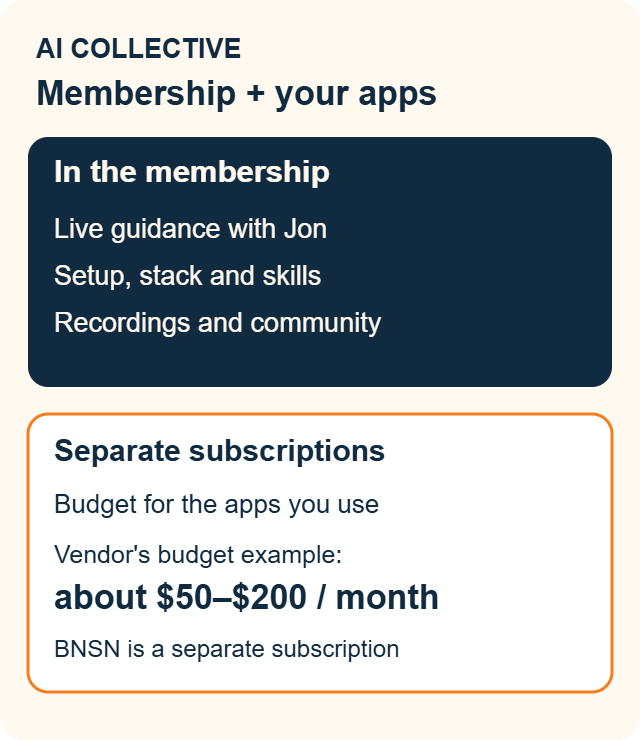
The membership and the apps are separate commitments. The external-app range is the vendor’s budget example.
The vendor’s October 27 FAQ suggests budgeting roughly $50–$200 a month for external apps, depending on your selection. Its examples include Claude Pro and Cursor Pro at $20 a month each, with Obsidian and Notebook LM described as free. These are the vendor’s planning examples; use the actual app plan you select when budgeting.
For BNSN, the same FAQ lists $49–$99 monthly for the copy engine, or $1,499 for a year of BNSN Plus with CourseBuilder and BookBuilder. Those are separate purchasing choices. You do not need to treat the longest available app list as your shopping list.
My recommendation: build around the first job you want to complete. A business assistant, a video workflow and a copywriting project can require different combinations. Let the job justify the services you add.
For a monthly membership budget, $297 plus the vendor’s $50–$200 app allowance gives an illustrative $347–$497 a month. That’s addition, not a fixed bundle or a promise about your bill. Quarterly membership is paid upfront; its payment timing is covered below.
This makes the separate-app con manageable: choose deliberately, track the subscriptions and add a service when the work calls for it. You are buying guidance on using a stack, not permission to ignore its running expenses.
Do you need to be a programmer?
The current FAQ says onboarding assumes no prior experience with Claude, Cursor or Obsidian. The offer is aimed at business owners, including people without a development background.
You still need a willingness to follow setup instructions, explain your business and work through corrections. In the interview, Jon compared unfamiliar AI terms to unfamiliar cooking terms: you learn the pieces as you use them.
Who Is AI Collective For, and Who Should Skip It?
Business owners with a recurring piece of work to improve. You create content, prepare marketing, handle internal information or coordinate a small team. Those repeat activities give you places to apply the setup and guidance.
Solopreneurs who are doing every part themselves. The useful starting question is which preparation or repeat work an assistant could handle, and where your own judgment needs to stay. Jon’s presentation example is a good model for a defined assignment.
Marketers who want to connect what they already know to AI. Your offer knowledge, customer understanding and ability to evaluate copy remain assets. Collective is relevant when you want help applying them through an AI workflow.
Small teams building a shared way of working. The advertised stack, skills and recordings can be shared across the team. If a colleague wants their own YouCloned install and live-call seat, the current offer lists an additional $197 monthly per person. Sharing materials and adding an individual seat are different arrangements.
Who should choose another route?
- You need one finished piece of copy. Evaluate the narrower BNSN copywriting tool or an appropriate service before adding an ongoing learning membership.
- You already know exactly which tool and method you need. A focused tutorial or the creator’s free skills may be enough.
- You want a private build delivered for you. Consider the separately advertised customization service, with its own scope and agreement.
- You have no room to implement this month. Choose a period when you can use the guidance. Paying for another place to collect recordings won’t move your project forward.
AI Collective Pricing: Monthly or Quarterly?
The public sales page and linked order displays list the following options on October 27, 2026:
| Plan | What you pay | What changes |
|---|---|---|
| Monthly | $297 each month | Shorter billing commitment; membership resources and coaching. |
| Quarterly | $797 upfront every three months | The membership plus four advertised bonuses; $94 less than three monthly payments. |
The quarterly payment is $797 at once. Its monthly equivalent is approximately $265.67; that is a comparison, not a monthly installment option.
The observed embedded checkout also localized its display for Germany. Read the final currency, amount and renewal interval on your selected order before paying. Keep the external-app budget alongside the membership amount.
The $94 decision, worked out
Three monthly payments: $297 × 3 = $891.
One quarterly payment: $797.
Difference: $94 saved across those three months.
That’s a genuine plan comparison. It doesn’t depend on assigning thousands of dollars of value to a course you may never open.
Choose quarterly if you already plan to use three months and the upfront payment works for you. You save the $94 and receive the extra resources.
Choose monthly if you want to commit one billing cycle at a time. The lower first payment gives you a shorter decision horizon. It is still a paid, non-refundable coaching purchase.
When quarterly doesn’t help: if you only intend to use one month, paying $797 to save against three hypothetical monthly payments defeats the point. Buy the period of work you actually intend to do.
What are the four quarterly bonuses?
The current stack consists of three trainings and one voice skill:
| Bonus | The advertised job | Vendor-listed value |
|---|---|---|
| Conversion Optimization System | Learn Jon’s editing framework and follow his sales-letter critique so you can evaluate your own page. | $499 |
| AI Funnel Profits | Follow 15 modules covering the offer, ads, opt-in, VSL, upsell, checkout, thank-you page and emails; the offer also lists ClickBank Mastery and a course guide. | $197 |
| VSL Mastery | Work with video-sales-letter scripts, frameworks and production templates, with training on the persuasion behind them. | $997 |
| Jon’s ElevenLabs v4 Voice Hack | Apply the supplied voice skill to your own voice work with ElevenLabs. | $995 |
| Total vendor-listed value | Advertised resources included with quarterly | $2,688 |
Those are the vendor’s assigned values, not money returned to your account or measured savings for a buyer.
The useful way to evaluate the stack is by your project. Editing an existing sales page? The Conversion Optimization System is the most relevant addition. Building a funnel? AI Funnel Profits addresses the sequence. Working on a VSL or voice production? The other two have a clear job.
Don’t let a bonus total choose your project for you. Let the project tell you which bonuses you will use.
Does AI Collective offer a free trial?
Treat the current offer as paid coaching membership, not a risk-free trial. Its coaching policy says no refunds. For a free starting point, Jon points to his starter skills in the interview; explore those before deciding whether you want live guidance.
Is there an AI Collective discount?
The concrete saving in the current offer is $94 for quarterly versus three monthly payments, plus the advertised quarterly bonuses. Use the listed options on the sales page to compare the commitment that fits you.
Does AI Collective have a lifetime deal?
This offer renews monthly or quarterly. The advertised retained downloads are different from lifetime membership or continuing hosted access. For ongoing guidance, compare the recurring plans.
Are there subscriptions to cancel?
Yes. The membership renews at your selected interval. External apps have their own subscriptions to manage. If you decide to stop coaching, cancel before the next billing date; the access and download distinction is explained below.
Do you need an AI Collective coupon code?
You can view the listed monthly and quarterly offers directly through the membership link. Choose between those displayed options; there is no need to enter a code just to compare them.
What Happens If You Cancel AI Collective?
Cancellation stops future coaching renewal; it is not a refund request. The current live-group-coaching terms say to contact customer service and cancel before the next billing date. You can continue participating until the end of your paid billing cycle.
The same terms state that live coaching and mastermind purchases are final, with no refunds. Choose the initial period on that basis. Monthly gives you a shorter billing period; it does not make the payment refundable.
The product FAQ also says you keep the skills and recordings you downloaded while you were a member. That means retained copies you have pulled. It is different from continuing access to a hosted service or membership vault after your paid period ends.
Before you leave, retain the downloads you want to keep and manage any separate app renewals. Your own working materials and your ongoing service subscriptions deserve separate attention.
Read the current BNSN terms, including the live-coaching cancellation and refund sections, alongside your selected order.
AI Collective Alternatives: When Is Another Route Better?
Free starter skills and focused tutorials
Their strength: you can explore the approach, learn a particular tool and move at your own pace without adding a coaching payment.
Jon directs people to his starter skills and AI setup material in our interview. That’s a sensible starting point if you’re still exploring what you want to build.
Choose Collective when you have the project and want live implementation guidance around it. Choose the free route when a defined lesson or resource answers your next question and you’re comfortable handling the rest.
BNSN for a narrower copywriting job
Its strength: focus. In the interview, Jon describes BNSN’s role as writing the words for sales pages, emails and ads. If you have an offer and only need help producing copy, a specialized copy tool addresses a narrower job than an ongoing implementation membership.
Collective makes sense when your question extends across the system: which tools to use, how to connect them and what business context to supply. BNSN remains separate if you choose to use it as part of that system.
A private custom build
Its strength: help tailored to constructing a setup around your operation. The current sales page advertises private customization separately from Collective; obtain its scope and payment terms before selecting it.
Choose that route when you want private building assistance. Choose Collective when you want to develop the ability to implement with the group guidance and resources. Those are different ways to get help, rather than interchangeable membership tiers.
Jon Benson AI Collective Review: Is It Worth Joining?
Yes—for a business owner who wants to learn practical AI implementation with Jon and will use the guidance on real work.
The video example captures what I like about his approach. Preserve the part of the performance that matters. Identify the production friction. Choose tools around that problem. Isaac’s presentation adds the other requirement: an assistant needs your business material, and you still judge what it produces.
For a new buyer, monthly is the straightforward first commitment when you want one billing cycle to apply the approach. If you already plan to spend three months on the work and can comfortably pay upfront, quarterly saves $94 and adds the four resources. Both need an app budget; neither is a refundable trial.
My recommendation is to choose the project before the plan. Know what you want help building, make room for the live guidance and use the setup on that job. If you only need one tutorial or a narrow copywriting tool, take that route instead.
If you want to work through a real business AI project with Jon’s guidance, the next step is clear:
Bring the business problem. Build the capability to solve it.


